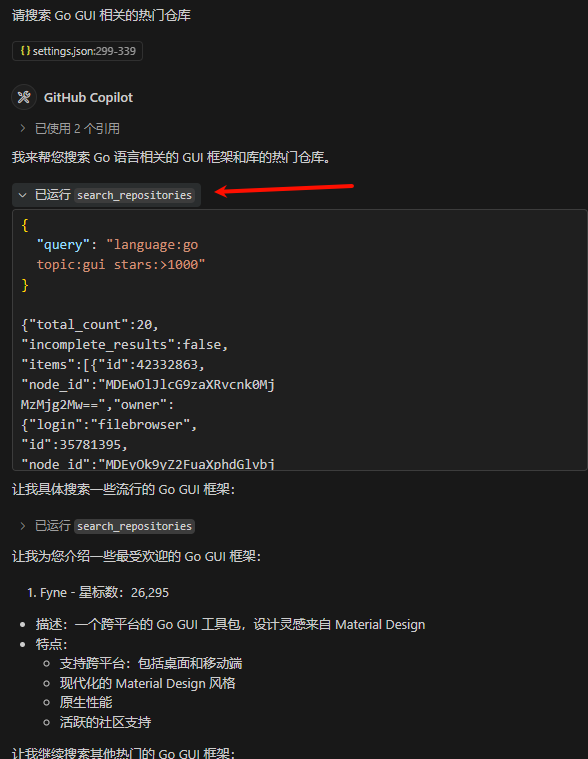
VSCode Copilot 使用 GitHub MCP Server(本地启动)
https://github.com/github/github-mcp-server
目前只有 vscode insiders 版本支持
-
创建一个 Personal access tokens,https://github.com/settings/tokens
-
安装 github-mcp-server 本地启动,需要将 GOPATH/bin 设置到 PATH 中 或者 指定 github-mcp-server 路径(command)
# 安装github-mcp-server
go install github.com/github/github-mcp-server/cmd/github-mcp-server@latest -
vscode 设置,添加这个设置到 settings.json 中,会提示输入 token 的
"mcp": {
    "servers": {
    "github": {
        "command": "github-mcp-server",
        "args": [
        "stdio",
        ],
        "env": {
        "GITHUB_PERSONAL_ACCESS_TOKEN": "${input:github_token}"
        }
    }
    },
    "inputs": [
    {
        "id": "github_token",
        "type": "promptString",
        "description": "GitHub Personal Access Token",
        "password": true
    }
    ]
} -
使用,在 vscode 中使用 copilot agent 模式,提问:请搜索 Go GUI 相关的热门仓库